Powerbrick™ Pro 140
Power Adapter | Support Guide
The Basics: What You Need to Know
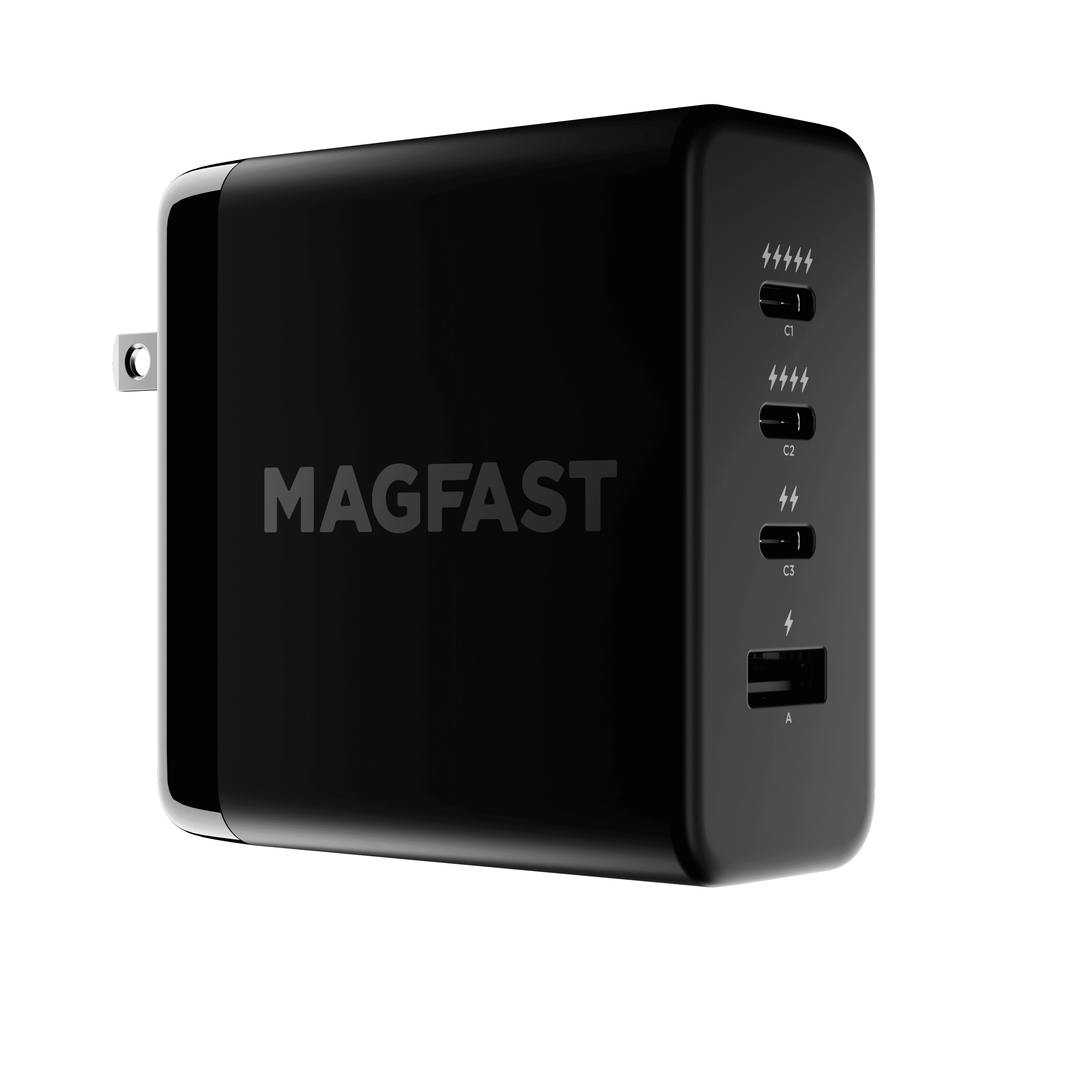
The MAGFAST Powerbrick Pro 140 is a powerful charging station designed to charge multiple devices simultaneously. With a total output of 140W, it features four ports that are clearly marked with lightning bolt symbols to indicate their power capabilities:
Top USB-C Port (⚡⚡⚡⚡⚡) - C1, up to 140W, highest priority port
Second USB-C Port (⚡⚡⚡⚡) - C2, up to 140W
Third USB-C Port (⚡⚡) - C3, up to 65W
Bottom USB-A Port (⚡) - A1, up to 22.5W
Simple Tips for Everyday Use
For laptops and power-hungry devices: Use the five-bolt (⚡⚡⚡⚡⚡) top port for your most important device
For additional laptops or high-power devices: Use the four-bolt (⚡⚡⚡⚡) second port
For tablets and mid-power devices: Use the two-bolt (⚡⚡) third port
For phones and accessories: Use the one-bolt (⚡) USB-A port
Rule of thumb: Always follow the lightning bolts - more bolts means more power!
Understanding the Lightning Bolt System
We've made it easy to understand your Powerbrick Pro 140 by using lightning bolt symbols to indicate each port's power capacity:
⚡⚡⚡⚡⚡ (Five bolts): Our highest priority port - always the best choice for your most important device
⚡⚡⚡⚡ (Four bolts): Nearly as powerful, perfect for a second laptop or high-power device
⚡⚡ (Two bolts): Great for tablets, smaller laptops, or medium-power devices
⚡ (One bolt): Ideal for phones, earbuds, and other accessories
How Power Distribution Works
The Powerbrick Pro is smart! It automatically adjusts power distribution based on which ports you're using and what devices are connected. Here's what happens in common scenarios:
When Using One Port
The five-bolt or four-bolt ports can each deliver up to 140W when used alone
The two-bolt port delivers up to 65W on its own
The one-bolt USB-A port provides up to 22.5W
When Using Two Ports
The Powerbrick maintains high power to important devices while staying within its 140W total capacity
For example, when using the five-bolt and four-bolt ports together, each can still deliver 65W (enough for most laptops)
When using the five-bolt port and the one-bolt USB-A together, the five-bolt port can still deliver 100W while USB-A provides 22.5W
The five-bolt port generally maintains higher power than the four-bolt port in multi-port scenarios
When Using Three or More Ports
Power is distributed across all connected devices
The Powerbrick intelligently balances the load while prioritizing ports with more lightning bolts
Even with all four ports in use, you'll still get solid performance from each device
Heat Management
On hot days or during extended heavy use, the Powerbrick has built-in temperature protection. If it gets too warm (reaching 95°C), it will temporarily reduce power output to protect your devices and itself. This is completely normal and helps ensure years of reliable service.
During these high-temperature situations, the five-bolt port maintains higher priority than the four-bolt port. This is why we recommend always connecting your most critical device to the five-bolt port - it will receive preferential power distribution when the device is managing heat.
Compatible With Your Devices
The Powerbrick Pro 140 works with virtually all USB devices including:
Android and Apple Smartphones
Laptops that charge via USB-C
Tablets (Apple, Samsung, etc.)
Earbuds and headphones
Portable game consoles
And many more!
It supports multiple fast-charging protocols including PD3.1, PPS, QC3.0, PD2.0, AFC, FCP, Apple2.4A, Samsung 2.0A, and more.
Remember:
While the Powerbrick Pro 140 is powerful, it can't deliver maximum power to all ports simultaneously. The total power is always 140W or less, distributed intelligently among the ports you're using.
For the best experience, just follow the lightning bolts:
More ⚡⚡⚡⚡⚡ bolts = More ⚡⚡⚡⚡⚡ power
Five bolts is always your best choice for your most important device
Work your way down from there based on each device's power needs
The lightning bolt system makes it simple to get the most from your Powerbrick Pro 140 without needing to understand all the technical details!
Contact us!
If something isn’t working as expected, we’ve got you 🙂
MAGFAST Support
Hello@MAGFAST.com