Products & Care
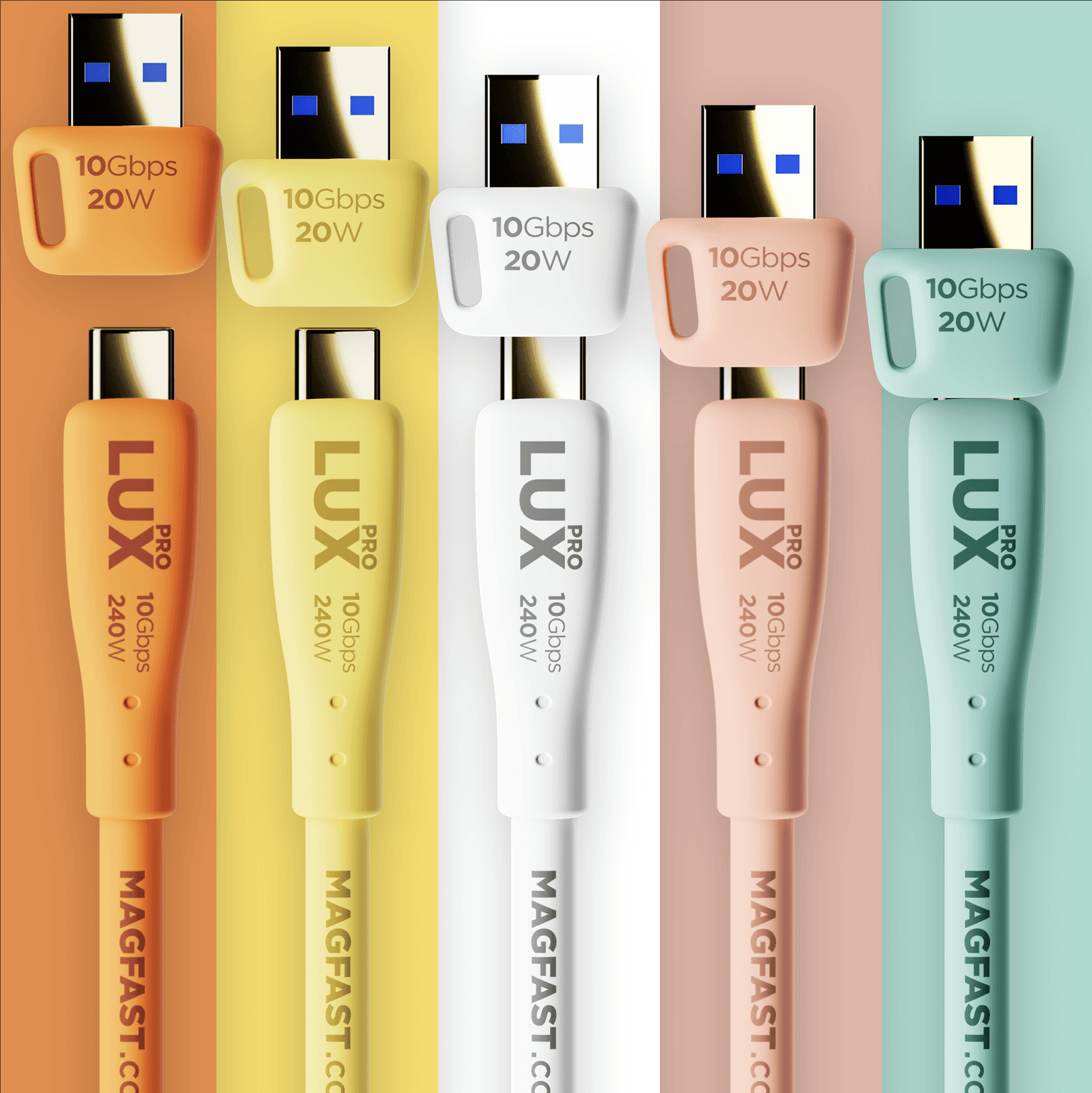
Lux® Pro
USB-C Cable — Setup & Support Guide
The Basics: What You Need to Know
The MAGFAST® Lux Pro is a premium USB-C cable built for charging, transferring files, and connecting all your devices — and it comes with a color-matched USB-A adapter and a silicone cable tidy right in the box.
At over 6ft (~2 meters), Lux Pro gives you plenty of reach. And with up to 240W of power and 10Gbps data speeds, it handles everything USB-C — phones, laptops, tablets, and much more.
Lux Pro is designed to be the last cable you'll need for the next decade and beyond. The Swiss Army Knife of cables.
What Can Lux Pro Do?
Lux Pro is the one cable you reach for, no matter what you're doing.
Charging. With 240W of PD Power Delivery®, Lux Pro fast-charges your phone, your tablet, or even a full-size laptop. Plug in and go — Lux Pro automatically delivers the right amount of power for each device.
Transferring files. At 10Gbps (USB 3.2), Lux Pro moves files in a fraction of the time. A big photo library or video folder that would crawl over an ordinary cable comes across fast.
Connecting devices. Lux Pro works beautifully with external drives, monitors, docking stations, and more.
Need USB-A? Your Lux Pro comes with its own USB-A adapter, so you can connect to older laptops, chargers, and desktops too. One important note: this adapter is made specifically for Lux Pro. The separate MAGFAST Lux USB-A Adapter 4-Pack is for the original Lux cable and isn't compatible with Lux Pro.
What Devices Work With Lux Pro?
All USB-C devices — including smartphones, tablets, laptops, earbuds, headphones, portable chargers, cameras, game controllers, handheld gaming consoles, external drives, monitors, docking stations, keyboards, mice, speakers, microphones, printers, projectors, VR headsets, drones, e-readers, and more.
Why Lux Pro Feels Different
Pick up a Lux Pro and you'll notice the difference right away. The soft silicone jacket feels smooth and supple in your hand — silky, never stiff or scratchy. It doesn't tangle, kink, or fight you when you coil it.
Inside, Lux Pro uses Teflon®-Graphene-infused wiring for maximum performance and durability. The connectors are Goldflash gold-plated for a reliable connection every time.
Built to Last
We certified Lux Pro to withstand 35,000 bends without any damage. To put that in perspective: if you plugged and unplugged your cable five times a day, every single day, that's over 19 years of use.
Many everyday cables start to fray, lose their shape, or stop working after just a few months. Lux Pro is engineered to keep performing — and looking great — for the long haul. That confidence is why your Lux Pro is backed by the MAGFAST warranty.
Six Colors to Choose From
Lux Pro comes in six colors, each one matched end to end: Alpine White, Seafoam Green, Candy Pink, Sunshine Yellow, Juicy Orange, and Carbon Black. The included USB-A adapter is color-matched to your cable.
Your Fingerprint® Code
Every MAGFAST product has its own unique identity. On Lux Pro, you'll find a laser-engraved Fingerprint web address in the format MAGFAST.com/FP/XXXX-XXXX, engraved right on the cable near the MAGFAST wordmark. Visit that link to register your cable, confirm it's genuine, and activate your warranty. It's your cable's one-of-a-kind digital ID.
What's in the Box
MAGFAST Lux Pro USB-C to USB-C cable (over 6ft / ~2m)
Color-matched USB-A adapter (Lux Pro specific)
Silicone cable tidy
And the box itself is gorgeous — perfect for gifting.
Troubleshooting & Quick Fixes
1. Nothing's Charging
Make sure both ends are pushed all the way in — at the wall adapter and at your device.
Check that your wall adapter is plugged into a live outlet, and try a different outlet.
Confirm your wall adapter actually delivers power over USB-C (some older adapters don't).
Plug Lux Pro into a different device to confirm the cable is fine, then narrow down from there.
2. Charging Is Slower Than Expected
Your device and your charger agree on a speed together — a low-wattage wall adapter caps how fast you can go.
For the fastest charge, pair Lux Pro with a higher-wattage USB-C adapter (Powerbrick Pro 140 is ideal).
Plug straight into the wall adapter rather than through a hub or extension where you can.
3. Files Won't Transfer / A Drive Isn't Recognized
For full 10Gbps speeds, both devices need to support USB 3.2 data.
Re-seat both ends and try a different port — some ports are charge-only and don't carry data.
If a drive needs its own power, give it a powered connection.
4. The USB-A Adapter Won't Fit
The adapter that came with your Lux Pro is the right one — it's made for Lux Pro.
If you're trying the Lux USB-A Adapter 4-Pack, that accessory is for the original Lux cable and won't fit Lux Pro.
5. A Connector Looks Dirty or Feels Loose
Wipe the connector gently with a soft, dry cloth.
The Goldflash plating is built for thousands of connections, so a snug, reliable fit should return.
FAQ
Q: Will Lux Pro charge my laptop? A: Yes. With up to 240W, Lux Pro handles full-size laptops, not just phones and tablets.
Q: Will it work with all my USB-C gear? A: Yes — Lux Pro works with all USB-C devices, from phones and laptops to drives, monitors, and docks.
Q: Which way round does it plug in? A: Either way. USB-C is reversible, and so is Lux Pro — both ends, both orientations.
Q: Can it charge and transfer data at the same time? A: Yes. Lux Pro carries power and data together.
Q: I bought the Lux USB-A 4-Pack — does it work with Lux Pro? A: No. That 4-Pack is for the original Lux cable. Your Lux Pro already includes its own matching USB-A adapter.
Remember
Lux Pro is designed to be the only cable you need. With 240W charging power, 10Gbps data speed, and a design that feels as good as it performs, it replaces a whole drawer full of ordinary cables.
Just plug in, and let Lux Pro handle the rest.
Contact us!
If something isn't working as expected, just tell us what you're connecting and what you're plugging into — and we'll take it from there.
We've got you 🙂
MAGFAST Support Hello@MAGFAST.com
Did this answer your question?